What is XSS?
If you’re reading this, you’ve likely read or heard about cross-site scripting or XSS. For me, something about those three letters XSS was confusing: “Why did the who’s who of hacking have to call it XSS instead of CSS?!”
Then I realised: “Ohhh… it’s probably because they didn’t want any confusion with CSS.”
CSS, Cascading Style Sheets, is the language and file type used to style web pages.
So one more mystery was cleared up.
It wasn’t long after this that someone showed me an example of how you can get XSS by actually breaking out of CSS elements! As if X marks the spot from which you break out of the CSS and into JavaScript!
This is essentially what XSS is: direct user input that breaks out of web languages like HTML, CSS, even JSON content, and into that very powerful and dangerous “X-mode” JavaScript: a programmable language that all browsers interpret and run to execute powerful functionality that makes the web so dynamic.
JavaScript and browsers
First it’s important to know that your browser has a powerful compiler to run JavaScript code. Almost all browsers do a Just-in-Time (JIT) compilation to execute JavaScript code when a webpage is loaded. On Chrome, type ctrl+shift+j to open up your Console and you can test out some JavaScript code. When you load a web page, your browser will run any JavaScript code that is part of that web page it just rendered. Like all programming languages, it can do some arithmetic, hold data in variables, make network requests, and did I mention interact with your session cookies? Well, thankfully that last bit about interacting with your cookies isn’t always true. JavaScript on the browser/client side can easily make use of various APIs, like the DOM API, which can make for some very destructive possibilities when it comes to weaponising XSS.
Alright, so JavaScript is a powerful programming language that web browsers like Chrome can execute, and XSS is a JavaScript-based vulnerability? Yep. Okay, so how do you “perform” an XSS attack then?
You know those input fields on web pages where you can enter in your name or a phone number? Well, when we do, we’re inserting data. Sometimes, we can actually “break out” and into writing some JavaScript code. You know HTML elements like <b> or <input> or CSS like <style>? Let’s say you’re the attacker. Depending on the input field you are entering data into, you might be able to prematurely close it off like the ones previously mentioned and inject a <script> tag or element to get the browser to run some JavaScript code you wrote! Let’s look at this example.
On the face of it, the blog website below doesn’t look like we have any chance to add our own input or text, as in there aren’t any forms or comment sections, right? But notice the page_id parameter in the URL?
Without looking at the web page source code (using the ctrl+u keybind) we can try a shot in the dark by trying to break out of the page 3 content by prematurely closing an HTML element with syntax like "> before adding a built-in JavaScript function:
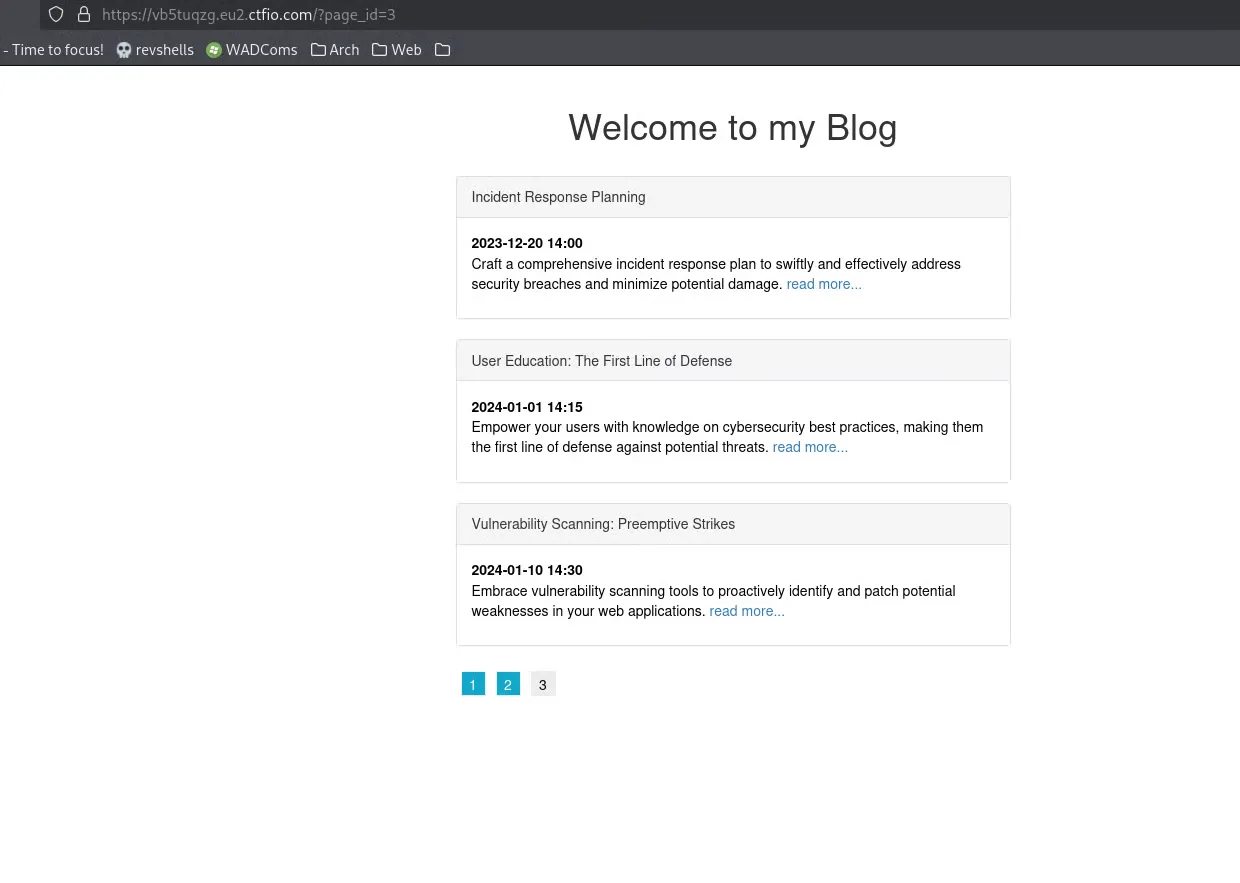
The target blog, with page_id=3 sitting in the URL.
prompt() is a built-in JavaScript function similar to alert().
But the XSS injection doesn’t work. If it had, the browser would load a pop-up prompt, so it looks like we can’t break out of page_id=3…
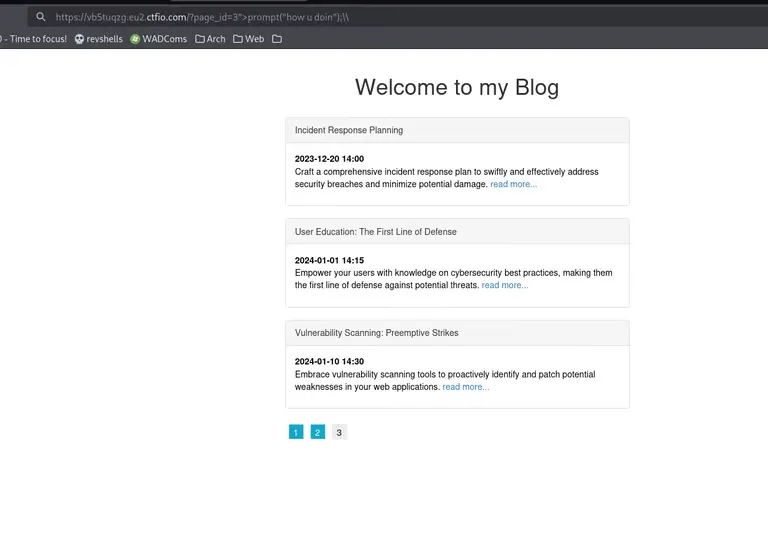
A prompt() payload in the URL, and no pop-up. The injection failed.
But a hacker won’t give up that easily. If we open up the source code or browser dev tools and look at how the page is being rendered, we’ll notice where our input is in the actual web page source code:
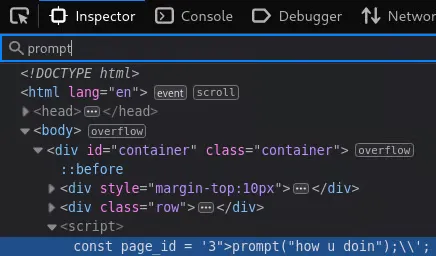
There’s the problem: our input lands inside a <script> tag, as part of the page_id variable.
As you can also see, characters like "> aren’t going to work here because we’re not in an HTML element. We actually have some control of inputting a value in the page_id const variable, which is already in a script tag! By itself, the original page 3 of the blog would execute:
const page_id = '3';But if we put 3';, we close and complete the const page_id variable declaration with valid syntax, and open up an opportunity to directly add some JavaScript of our own:
3';prompt("how u doin");//Now we can add the prompt() function and close it off, refresh the page, and see our JavaScript code in action:
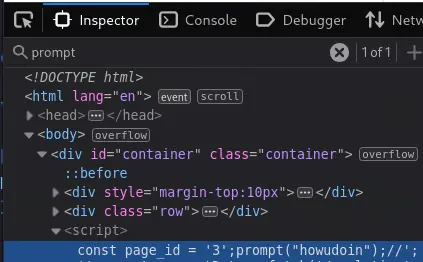
The payload slips out of the string and calls prompt() inside the page’s own script.
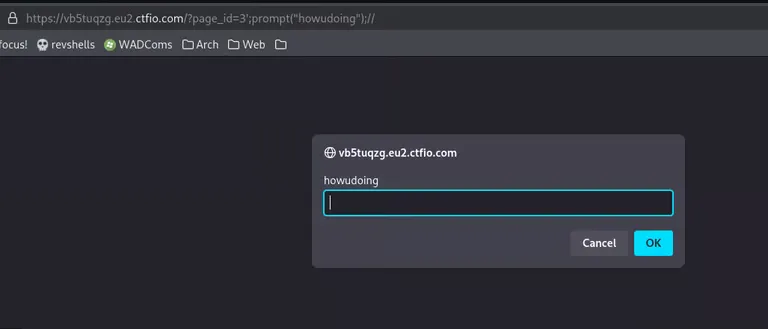
Reflected XSS confirmed: our JavaScript is running in the page.
Weaponizing XSS
Notice how in the above screenshot, our input is ALSO part of the URL. This is commonly referred to as reflected XSS. But what can we do with this?
Reflected XSS is so nasty because most people understand to verify if the URL or link is a trustworthy site. For example, youtube.com or google.com.
But a reflected XSS on a site means there’s embedded JavaScript within the URL link.
One powerful way an attacker can abuse an XSS vulnerability on a trusted site is by attempting to steal session cookies. Anyone who clicks that URL or visits the page with the injected script will have a JavaScript payload execute in their browser, which in this case, would result in the annoying prompt() popup. But XSS can be far more exploitative.
Session cookies are generated by web applications — like your banking site, Microsoft 365 apps for work or university, shopping sites, and so on. These cookies are stored by your browser and automatically sent along with each request to the web application to maintain your authenticated session.
If an attacker phished someone into clicking a malicious link or visiting a page with a reflected XSS payload, they might be able to exfiltrate the session cookie to their own website or server they control. This is done by injecting JavaScript code that forces the browser to make a request to a webhook or request bin that includes the victim’s session cookie.
However, this only works if the cookie is accessible to JavaScript, meaning the session cookie is not set with the HttpOnly flag. When HttpOnly is enabled (which is considered best practice), JavaScript cannot access the cookie at all, even with an XSS vulnerability.
In my experience, the use of HttpOnly on session cookies is becoming more common, but it’s still not universal — especially in older or custom-built web apps.